



The Blue Yeti: Debate, Hype, and Your Audio Upgrade
The Blue Yeti microphone review is here. Blue yet has become a fixture in the world of content creation. You’ve seen it on YouTube, heard it on podcasts, and perhaps even considered grabbing one for yourself. But amidst the hype and passionate opinions—both for and against—it’s hard to know if the Blue Yeti is truly the right tool for the job.
Is it a magic bullet for beginners, a sound investment for audio improvement, or simply a trendy piece of gear? Are there other options that might suit your needs even better? Microphones like the Shure SM7B, the versatile Rode NT-USB, the budget-friendly Samson Q2U, or even the compact Razer Seiren X could be excellent choices, depending on your needs. In this guide, we’ll cut through the noise, examine the Blue Yeti’s features, help you master its features, and ultimately decide if it’s the microphone that will take your content to the next level.
So, whether you’re a seasoned podcaster or a budding YouTuber, this guide will equip you with the knowledge to make an informed decision about the Blue Yeti. Of course, depending on your specific needs and budget, other fantastic microphones might be worth considering. We’ll briefly touch on a few potential alternatives at the end of this guide.
editor@newspatron.com
Blue Yeti Microphone Review
An In-Depth Look

Form Factor:
- Iconic cylindrical design on a sturdy desktop stand.
Connectivity:
- Simple plug-and-play USB connection (no additional audio interfaces or drivers needed)
Polar Patterns:
- Four switchable patterns—cardioid, bidirectional, omnidirectional, and stereo—for versatile recording scenarios.
Controls:
- Volume dial, mute button, and gain control on the microphone itself for real-time adjustments.
Audio Monitoring:
Recommended Product
Casio Vintage A168WA Digital Grey Unisex Watch
🛒 View on Amazon →As an Amazon Associate, we earn from qualifying purchases. Price and availability may vary.
- Built-in headphone jack for zero-latency monitoring (hear yourself as you record).
Technical Specifications:
- Power Required/Consumption: 5V 500mA (USB)
- Sample Rate: 192 kHz for high-resolution audio.
- Bit Rate: 24-bit for detailed sound capture.
- Capsules: Three Blue-proprietary 14mm condenser capsules.
- Frequency Response: 20Hz to 20kHz (captures a wide range of sounds).
- Sensitivity: 4.5mV/Pa (1 kHz)
- Max SPL: 120dB (handles loud sounds without distortion).
- Dimensions: 4.72? (12cm) x 4.92? (12.5cm) x 11.61? (29.5cm)
- Weight: 1.2 lbs (.55 kg) for the microphone, 2.2 lbs (1 kg) for the stand.
- System Requirements: Windows 7, 8.1, 10 or macOS 10.10 or higher. Requires a USB 2.0/3.0 port.
Why These Specs Matter
These specifications ensure the Blue Yeti can deliver professional-level recordings for podcasts, streaming, music, and more. Its high-quality audio, ease of use, and robust build make it a reliable choice for creators across various skill levels.
Compatibility and Real-World Performance

Operating System Compatibility:
- Fully compatible with Windows 7, 8.1, 10, and macOS 10.10 or higher.
- No need for additional drivers thanks to its USB plug-and-play design.
Software Integration:
- Works seamlessly with popular recording software such as Audacity, GarageBand, and Adobe Audition.
- Its versatility makes it suitable for a wide range of applications, from podcasting to music production.
Optimizing Performance:
- Recording Environment: The Blue Yeti performs best in a controlled environment. To achieve optimal audio quality, it’s recommended to record in a quiet space with minimal echo.
- Microphone Placement: Positioning the Blue Yeti correctly is crucial. For example, when using the cardioid pattern, aim the microphone at the sound source for the best pickup.
- Accessories: Enhancements like a pop filter can reduce plosive sounds, and a boom arm can provide flexibility in microphone placement, further improving sound quality.
[Read about Apple Google AI Partnership: The Future of Smartphones]
Real-World Applications :

- Streaming: “Love how easy it is to control my audio levels on the fly with the Blue Yeti. My viewers always comment on how crisp my stream sounds!” – Alex T., Twitch streamer
- Music Recording: “I’m surprised at how well the Yeti captures my acoustic guitar and vocals. It’s perfect for my home demos.” – Ben M., singer-songwriter
Unlocking the Blue Yeti’s Features
The Blue Yeti’s straightforward controls belie its surprising depth. Understanding these features is key to getting the most of your microphone.
Gain: The Sensitivity Factor
- What is Gain? Simply put, gain determines how sensitive the microphone is to sound. The higher the gain, the more easily it picks up quieter sounds.
- The Balancing Act: Finding the right gain setting is essential. Too low, and your voice will be faint and require boosting later (risking added noise). Too high, and you risk clipping (distortion).
- Ideal Gain: Aim for a peak level between -12dB and -6dB in your recording software. A good starting point: Keep the gain knob around the halfway mark and adjust from there.
Pickup Patterns: Beyond Cardioid

- Cardioid:
- Most common for single-source recording like podcasts or voiceovers.
- Captures sound primarily from the front, minimizing room noise.
- Stereo:
- Creates a wide, spacious sound field.
- Ideal for recording instruments or capturing ambiance.
- Omnidirectional:
- Picks up sound equally from all directions.
- Great for group recordings or immersive room sound.
- Bidirectional:
- Records from the front and back of the microphone.
- Perfect for interviews or duets.
[Read how to unleash Unleashing Creativity with Claude-3 Opus]
Microphone Technique and Troubleshooting
Addressing the Yeti
Speak directly into the front of the microphone (the side with the Blue logo) for most patterns. The exception is bidirectional, where you speak into the front and back.
Quick Troubleshooting
- Popping or buzzing: Use a pop filter, adjust gain, check for nearby electrical noise.
- Muffled sounds: Ensure correct distance from the microphone (around 4-8 inches).
- Background Noise: Control your environment, use cardioid mode, consider a shock mount.
- Connection Issues: Connect directly to your computer’s USB port, update drivers.
- Distortion: Decrease gain on the microphone itself.
Remember: Further troubleshooting resources can be found in the Blue Yeti manual or on their support website.
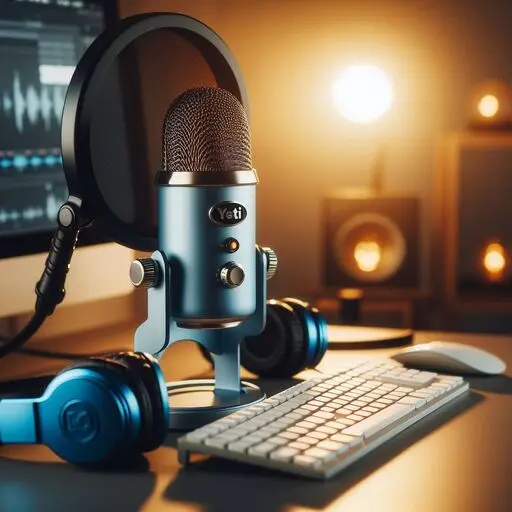
Supercharge Your Setup: Essential Blue Yeti Accessories
The Blue Yeti is an excellent microphone out of the box, but a few key accessories can take your recordings to the next level. Here’s a breakdown of the must-haves:

The Pop Filter: Your Anti-Plosive Shield
- Purpose: A pop filter minimizes harsh “p” and “b” sounds (plosives) that can distort your recordings.
- Essential for Vocals: If you’re doing any kind of voice work, a pop filter is non-negotiable.
- Types: Simple mesh screens are effective and affordable, while metal filters offer additional durability.
[Read about F&D PA200: Your Ultimate Party Starter]

The Boom Arm: Flexibility and Stability
- Why a Boom Arm? Boom arms elevate your microphone and free up desk space. They also help reduce vibrations that can travel through your desk and into your recordings.
- Flexibility: Boom arms allow precise microphone positioning for the best possible sound.
- Consider Your Setup: Choose a boom arm with appropriate weight capacity for your microphone and desk type (clamp-on or freestanding).
The Shock Mount: Minimize Those Vibrations
- Purpose: Shock mounts isolate your microphone from accidental bumps and vibrations that can ruin your audio.
- Improved Sound: Especially important if you type or move things around on your desk while recording.
- Compatibility: Make sure to purchase a shock mount specifically designed for the Blue Yeti.

Other Enhancements
- USB Cable: A longer USB cable can offer more flexibility in your setup.
- Headphones: Quality headphones are essential for monitoring your audio and avoiding latency.
- Microphone Windscreen: Ideal for on-location recording to minimize wind noise.
You can find a wide variety of Blue Yeti accessories from online retailers like:
- Amazon
- Sweetwater
- B&H Photo Video
- Directly from Blue’s website
Important Note: Always check accessory compatibility with your specific microphone model.
[Read how to Maximize Your Android Battery: 24/7 Power]

The Blue Yeti, along with a wide variety of compatible accessories, is readily available in India through popular online and offline retailers. Some reliable sources include:
- Major E-commerce Platforms: Amazon India, Flipkart
- Music Equipment Stores: Furtados, Bajaao
- Electronics Retailers: Reliance Digital, Croma
Important Note: Always check accessory compatibility with your specific microphone model.
Is the Blue Yeti the Right Microphone for You?
The Blue Yeti has established itself as a versatile and user-friendly microphone, popular among creators worldwide and in India. Let’s examine its suitability for different users and consider expert opinions:
Suitability for Diverse Needs
Podcasters: The Blue Yeti’s plug-and-play functionality and multiple polar patterns make it a popular choice for solo podcasts and interviews.
- Streamers: With zero-latency monitoring and a sturdy build, the Yeti ensures clear audio, keeping up with the demands of live streaming.
- Musicians: While not a studio-grade microphone, the Yeti is capable of capturing demos and ideas with respectable quality.
- Remote Workers: Virtual meetings take on a professional edge with the Yeti’s clear audio. It’s a worthwhile investment for those who prioritize communication .
- Hobbyists: Whether it’s voiceovers, gaming sessions, or simply upgrading your setup, the Yeti offers quality and ease of use.
[World’s best free video editor DaVinci Resolve 18.6.5: Upgrade Now for FREE Power]
[Read how Android AI is making your Phone Smarter]
Expert and User Insights from India
- Matt Brook’s Review: The Blue Yeti is noted for its reliability, versatility for various recording tasks, and for its user-friendly features. [Include a link to the review if possible].
- YouTuber Reviews: Users praise the Yeti for its audio quality in live streaming and voice recording scenarios. Its popularity among streamers and YouTubers suggests it’s a proven performer.
Conclusion
The Blue Yeti is a compelling option for Indian content creators. Its blend of quality, versatility, and ease of use make it a valuable addition to any setup.
[Read how to Create Your Own AI Chatbot]
Before You Decide
As always, consider your specific needs, budget, and recording environment when choosing a microphone. If you prioritize a user-friendly and adaptable microphone, the Blue Yeti might be the perfect fit.
Ready to experience the Yeti? Check out trusted online stores like Amazon India or Flipkart, or visit your local music or electronics retailer to give it a try!
[Read about Semiconductors: The Tiny Tech Driving Our World]
[Read about Emo Ai. How is Emo AI Revolutionizing Animation]
